
Hesaplı
Income, expenses and budget for iPhone
Your month, at a glance.
Hesaplı is a budget app where you log income and expenses by hand, in two taps. See what you spent this month, what is left of your budget and how the month is going, all on one screen.
- Free download
- No bank connection
- No account
- No ads, no tracking





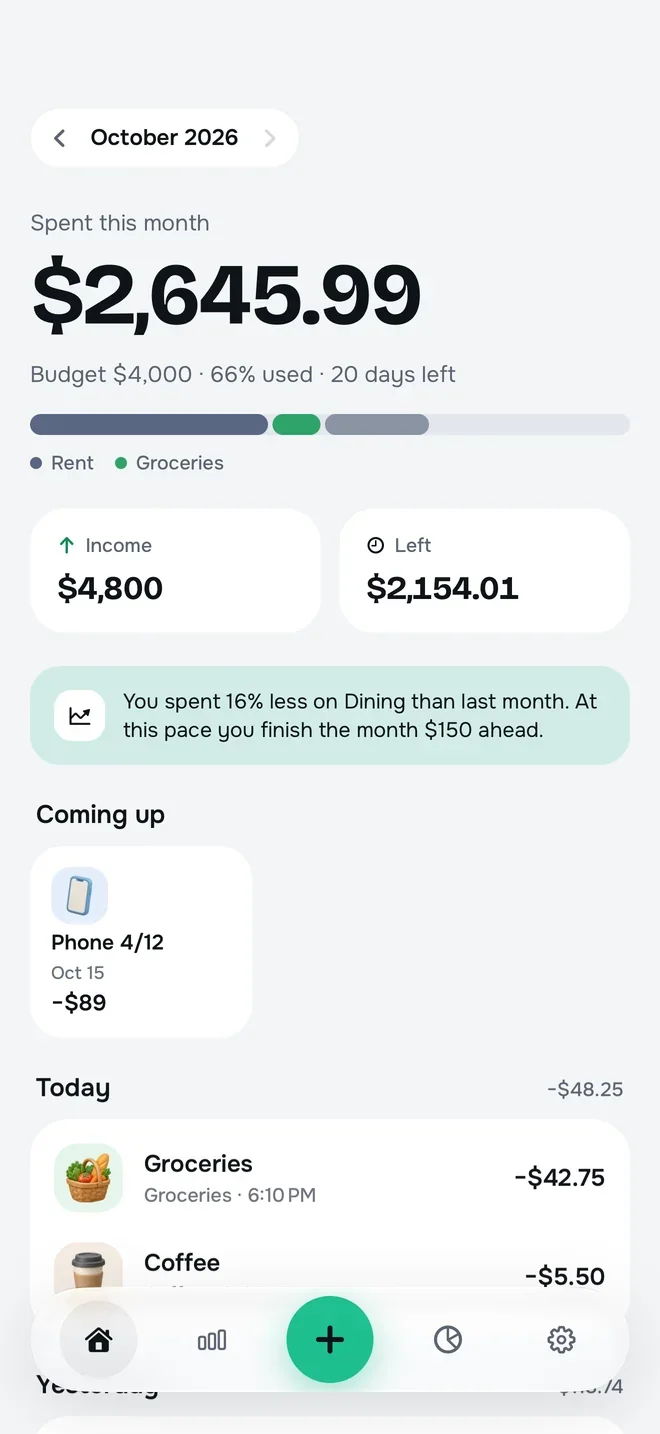
A sample month: 66% of a $4,000 budget spent. Each tick on the ring is 1% of the budget.
Two taps
Type the amount, tap a category, save.
No bank connection
You enter every record yourself; no passwords, no linked accounts.
Stays on your iPhone
No account, no server. Your backup is a file you save.
Built for Turkey
Installments, credit card cycles and a month that starts on pay day.
Home
The whole month, on one screen.
The first thing you see when you open Hesaplı is what you spent this month, in big, clear numbers. Below it: a ribbon that splits your budget by category, your income, what is left and a one-line insight about how the month is going.
- Big numbersWhat you spent this month and how much of your budget is used, at a glance.
- Budget ribbonYour budget split by category; the colours show where most of your money goes.
- Income and what’s leftWhat came in and what went out, side by side, with what’s left always in view.
- The month’s insightOne sentence on what changed and how you will finish the month at this pace.
Spent this month
$2,645.99
Budget $4,000 · 66% used · 20 days left
- Rent$1,650
- Groceries$297.75
- Dining$99.75
- Coffee$49.75
- Other$548.74
Income
$4,800
Left
$2,154.01
Example insightYou spent 16% less on Dining than last month. At this pace you finish the month $150 ahead.
25 category icons
Every expense has a face.
Hesaplı comes with 25 hand-picked 3D icons: soft, glossy, as if made of clay. You find the category you want without reading the list.
- Groceries
- Dining
- Coffee
 Transport
 Bills
Bills Rent
Rent Fun
Fun Clothing
 Subscriptions
 Health
 Car
Car Fuel
Fuel Phone & internet
 Education
 Gifts
Gifts Travel
 Pets
Pets Sports
 Personal care
 Donations
 Other
Other- Salary
 Side income
- Investments & gold
 Credit card
Two-tap entry
Spent it? Two taps and it’s in.
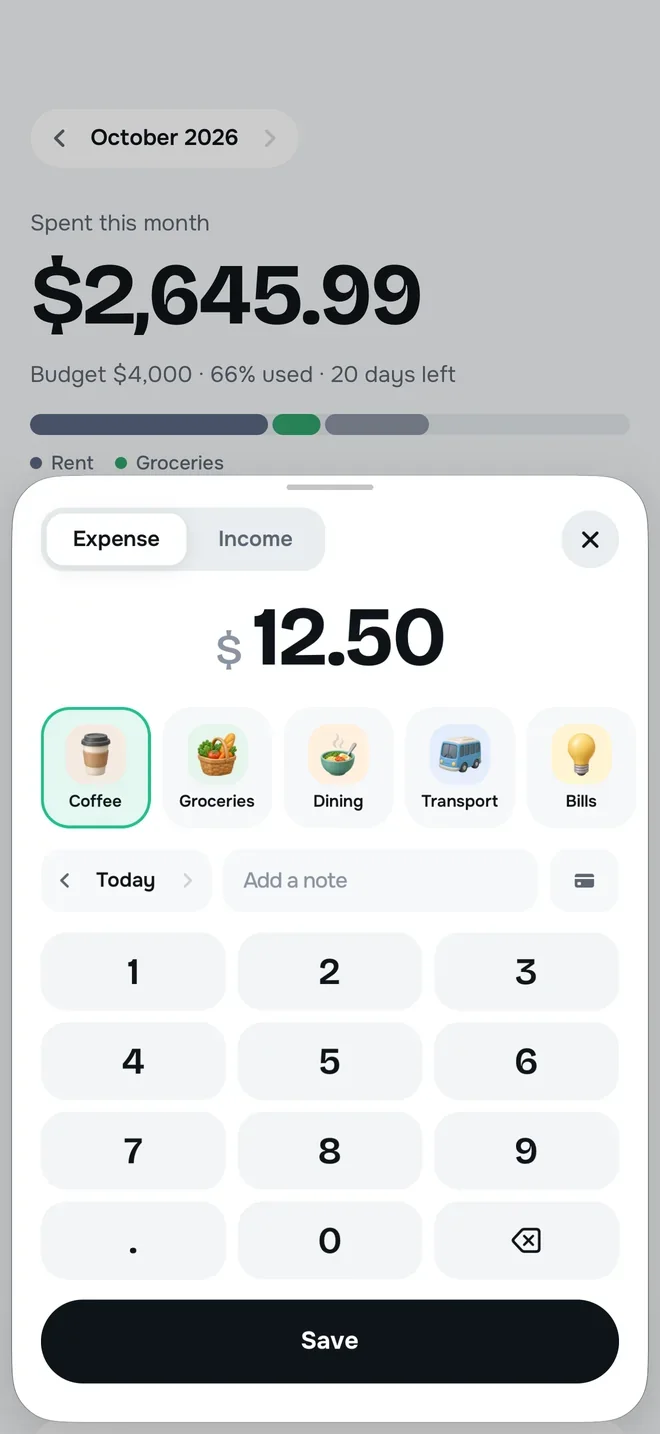
Tap the plus button in the middle and a big keypad opens. Type the amount, tap a category, save. That’s it.
- A big keypad: expense or income, picked on the same sheet
- Categories are sorted by use, so your usual one is always up front
- Forgot yesterday’s coffee? Change the date and add a short note if you like
Stats
Which day, which category, versus last month.
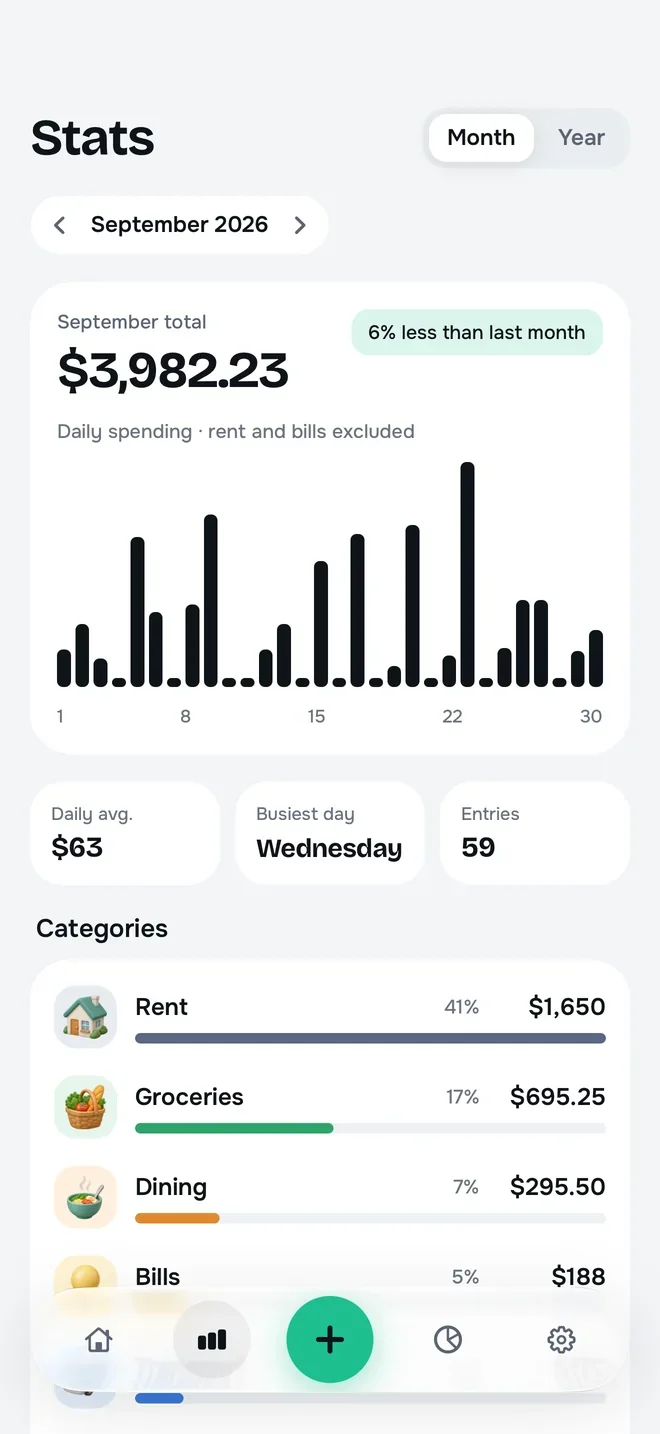
The Stats screen breaks your month down by day and by category. Where did the money go? One scroll answers it.
- Daily spending bars; rent and bills left out, so you see the real rhythm of everyday spending
- Compared with last month, in percent
- Category breakdown: each category’s share and amount, largest first
- Yearly and comparative stats are in Hesaplı Pro
Budget
Your budget becomes a daily number.
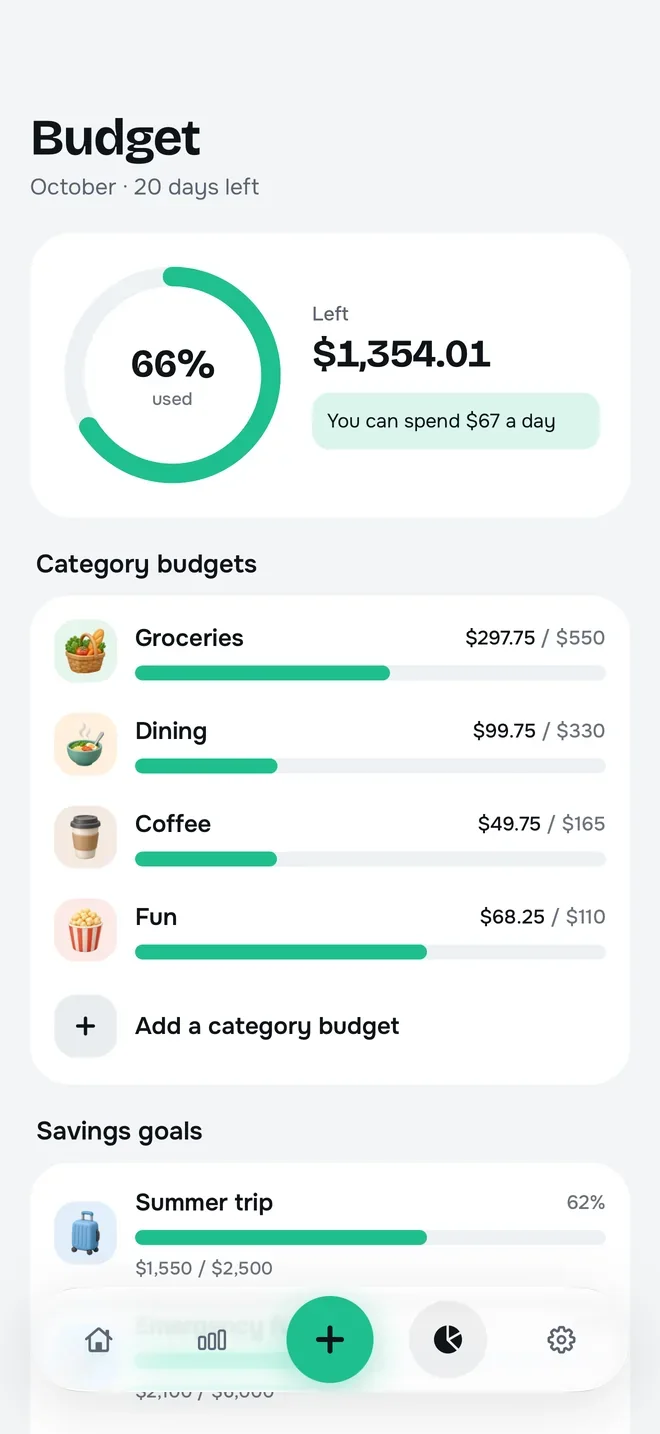
Set a monthly budget and Hesaplı works out how much you can spend each day until the month ends. The ring shows how much you have used; category budgets show where to slow down.
- Example: “You can spend $67 a day”
- Category budgets turn amber near the limit and red when over
- The free version includes a monthly budget and 2 category budgets; Pro makes category budgets unlimited
- Savings goals: a holiday, a new phone, an emergency fund
Made for Turkey
Installments, statements, pay day.
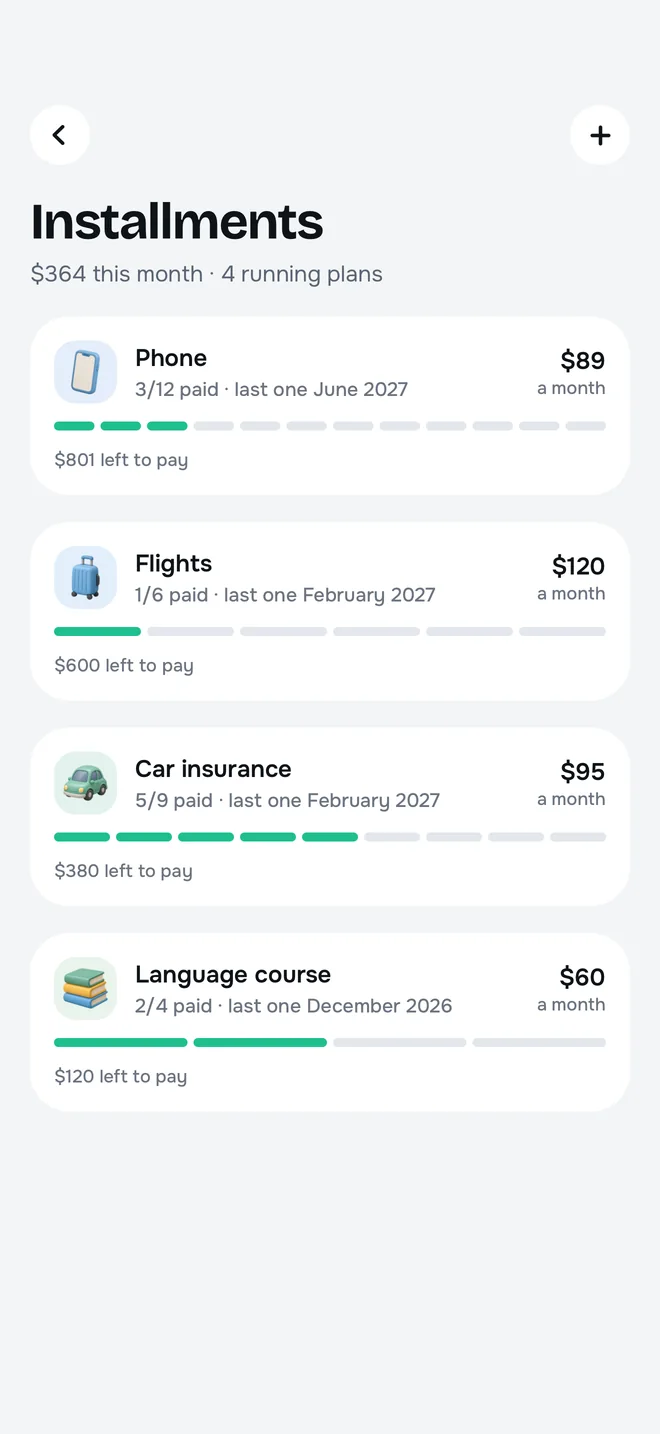
Managing money in Turkey has its own rules. Hesaplı knows them from day one.
- Installments (Pro): track purchases paid in installments and what is left
- Credit card cycle (Pro): statement and due dates, card spending by statement period
- The month starts on pay day: you choose when your month starts; budget and summary count from that day
Currency and gold · Pro
Money on the side, counted in too.
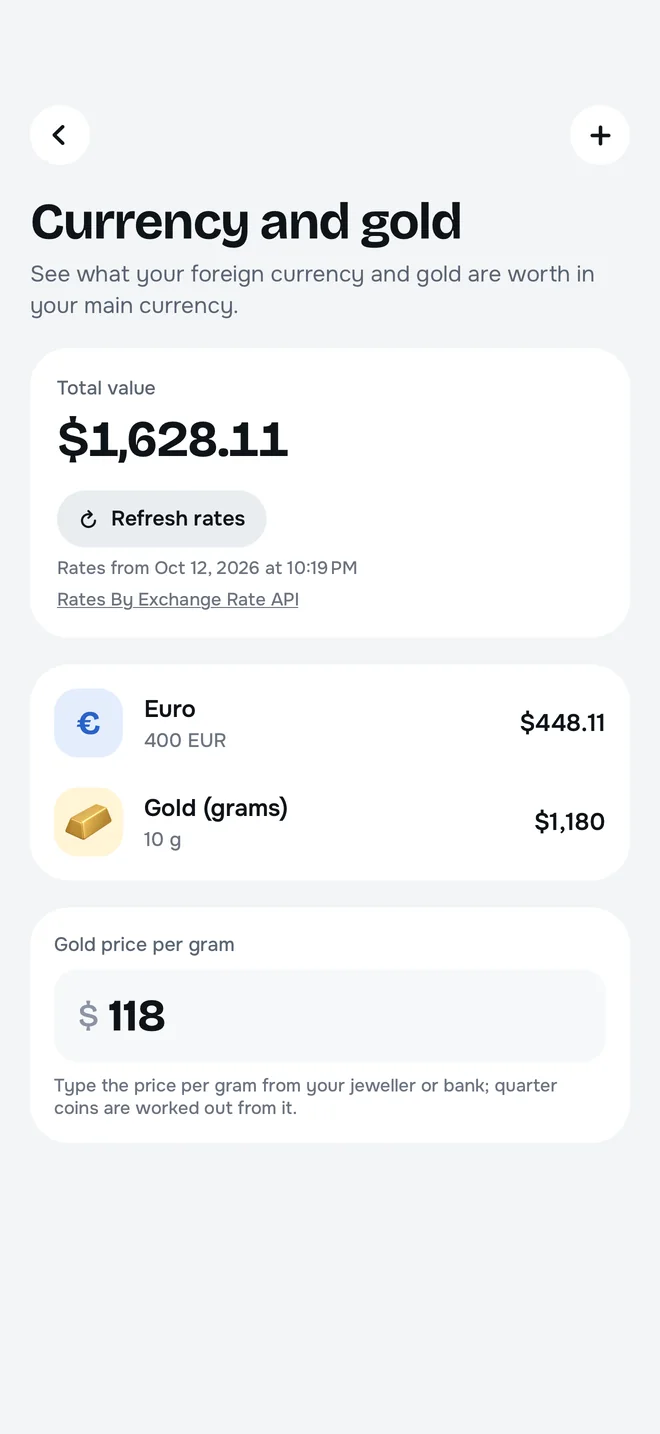
Keep track of foreign currency and gold holdings in the same place as your spending, and see what they are worth in your main currency. You type the gold price per gram; quarter gold coins are worked out from it.
- Refresh rates and current rates come from ExchangeRate-API; no personal information is sent
- Rates are for information only and may differ from your bank’s or jeweller’s prices
And more
Looks simple, works fully.
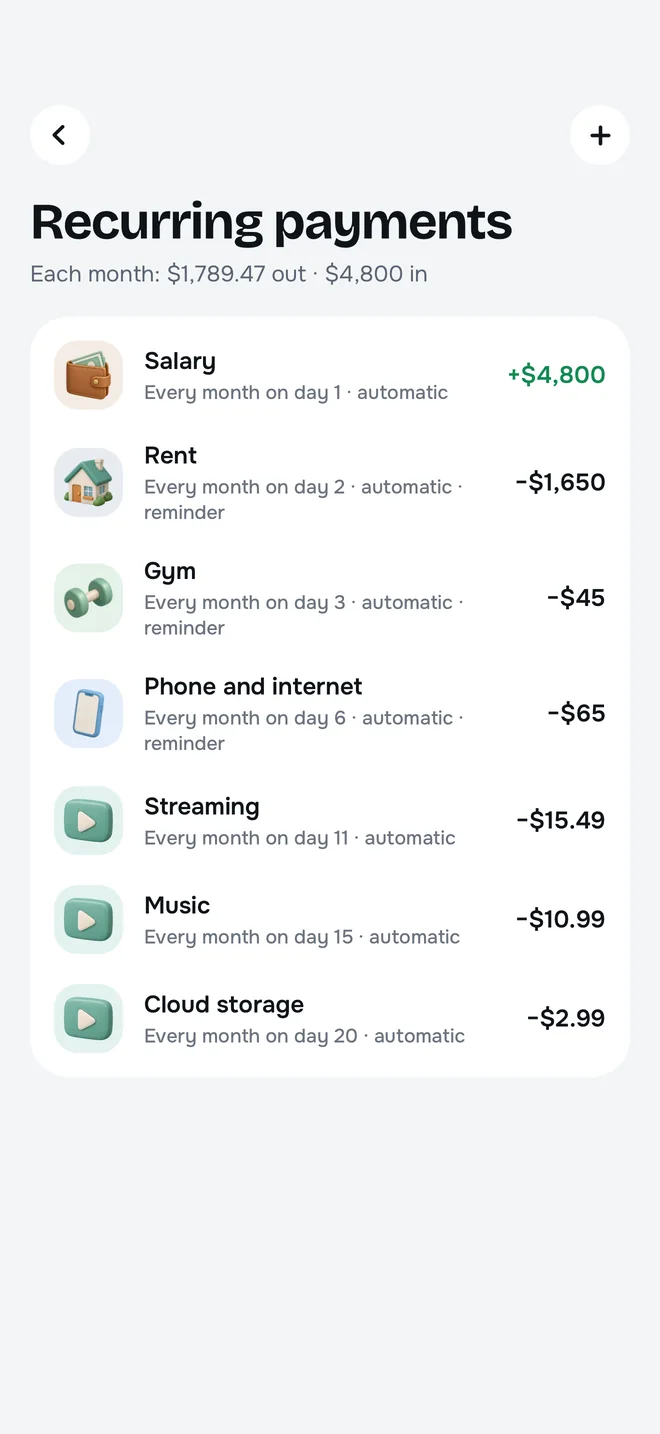
Recurring payments
Rent, subscriptions, bills: set up repeating payments once and get a reminder as the due date nears. In Hesaplı Pro.
Savings goals
A holiday, a new phone, an emergency fund. Set a goal and see how close you are.
Widgets
The Home Screen widget is free. Lock Screen widgets are in Hesaplı Pro.
Back up and restore
Your backup is a file: save it to iCloud Drive with the Files app, or wherever you like, and restore it on a new phone.
CSV and PDF export
Export your entries to a spreadsheet or a shareable PDF. In Hesaplı Pro.
Face ID lock
Your face opens Hesaplı; whoever picks up your phone can’t see your spending. In Hesaplı Pro.
Screens
A closer look at Hesaplı.
Home
New entry
Stats
Budget
Installments
Recurring payments
Currency and gold
Privacy
Your money. Your data.
You don’t open an account or connect your bank to use Hesaplı. Your entries are stored only on your iPhone; your backups are files you save. Purchases go through Apple; your payment details never reach Hesaplı.
Privacy0
Bank connections
0
Accounts
0
Ads
0
Tracking and analytics
FAQ
Frequently asked questions.
For backups, changing phones and subscription steps, see the support page.
SupportIs Hesaplı free?
What’s in Hesaplı Pro?
Do I need to connect my bank?
Where is my data stored?
What happens to my entries if I change phones?
Can my month start on pay day?
How do I cancel my subscription?
Does Hesaplı give financial advice?
Which languages does it support?
Your month, soon in your pocket.
Hesaplı is coming soon to the App Store. Free to download; no bank connection, no account, no ads.